ChartStructure
ChartStructure manifests describe charts that show categories, groups, and variances.
They work on datasets with category-style dimensions and scenario-style measures.
Spec outline
Section titled “Spec outline”apiVersion: bino.bi/v1alpha1
kind: ChartStructure
metadata:
name: revenue_by_region_chart
spec:
dataset: revenue_by_region # string or array
chartTitle: "Revenue by region"
filter: "region_group = 'EMEA'"
level: category # rowcategory | category | subcategory | auto
order: ac1 # category | categoryindex | rowgroup | rowgroupindex | ac1-4 | fc1-4 | pp1-4 | pl1-4 | auto
orderDirection: desc
measureScale: M # SI prefix or GREATEST/LEAST
measureUnit: "EUR"
percentageScaling: "default" # name or number
unitScaling: "default" # name or number
internationalisation: "_system"
internationalisationMode: "default"
translation: "chart.revenue.by_region"
showCategories: true
showMeasureScale: true
limit: 10
pixelPerUnit: 0.1
scenarios: ["ac1", "py1"] # ac1-4 | fc1-4 | pp1-4 | pl1-4 | auto
variances: ["dpy1_ac1_pos"]
scale: auto # "" | none | auto | 0.5 | 1.2 | …
stack: # optional stacked chart config
by: scenarios # scenarios | dimensions
mode: absolute # absolute | relative | absolute-relative
order: dataset # asc | desc | datasetFields
Section titled “Fields”dataset– required; string or array of dataset names.chartTitle– optional custom title.filter– optional filter expression.level– aggregation level:rowcategory,category,subcategory, orauto. When set toauto, the level is detected from the dataset silently. When left blank, it is detected with a warning.order/orderDirection– sort key and direction; if you use a scenario, it must appear inscenarios. Setordertoautoto detect from the dataset silently. When left blank, it is detected with a warning.measureScale– SI prefix (_,k,M,G, … orGREATEST/LEAST).measureUnit– unit string, for examplemEUR.percentageScaling/unitScaling– name of a scaling group or numeric scaling factor. WhenunitScalingis set to a numeric value and bars exceed the available container width, an overdrive bar is rendered: the bar is visually split into a base section, a zigzag break indicator, and a proportionally scaled overdrive section beyond it. This preserves value labels and relative comparisons between overflowing bars instead of clipping them. AC scenario bars break at a wider point than non-AC scenarios (PP, FC, PL) to maintain visual hierarchy.showCategories,showMeasureScale– visibility flags.limit– maximum bars per group; rows beyond the limit are cumulated as REST.pixelPerUnit– explicit scaling override.scenarios– list of scenarios (up to 4); values likeac1–ac4,fc1–fc4,pp1–pp4,pl1–pl4, orauto. When set toauto, scenarios are detected from the dataset silently. When left blank, they are detected with a warning.variances– list of variance definitions of the formd<scenarioB>_<scenarioA>_[pos|neg|neu].scale– proportional scaling of the chart (font size, spacings, and bar lengths all scale together). Scaling triggers on height overflow (vertical category labels cut off).- not set or
""– auto-scale to fit the parent height; emits anAUTO_scalewarning with the applied factor. "none"– no scaling; render at the base font size regardless of available space."auto"– auto-scale to fit the parent height silently (no warning)."0.5","1.2", … – fixed factor applied to the base font size. All dimensions scale proportionally.
- not set or
stack– optional object to enable stacked bar rendering:by– (required) stacking dimension:scenariosstacks scenario slots end-to-end;dimensionsauto-derives the stack column from thelevelprop (rowGroup→category,category→subCategory). When usingdimensions, only the first scenario is used; additional scenarios are discarded with a warning.mode– stacking mode:absolute(additive, default),relative(100% stacked), orabsolute-relative(absolute height with percentage labels).order– segment order within each stack:asc,desc, ordataset(default).
Example: Top 10 regions with variance
Section titled “Example: Top 10 regions with variance”---
apiVersion: bino.bi/v1alpha1
kind: ChartStructure
metadata:
name: top_regions_chart
spec:
dataset: revenue_by_region
chartTitle: "Top 10 regions by revenue"
level: category
order: ac1
orderDirection: desc
measureScale: M
measureUnit: "EUR"
limit: 10
scenarios: ["ac1", "py1"]
variances: ["dpy1_ac1_pos"]
showMeasureScale: true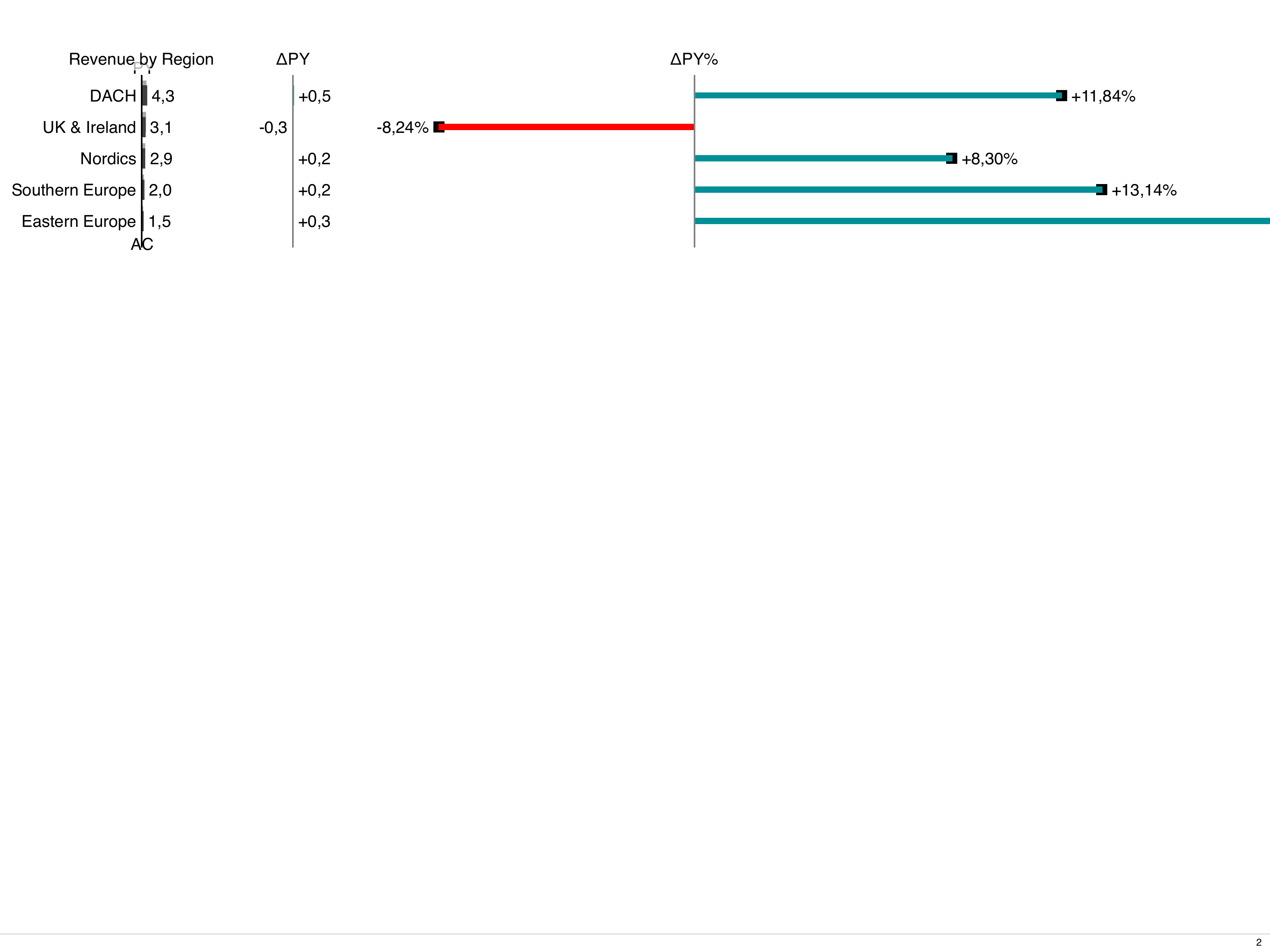
Example: Stacked bars by scenario
Section titled “Example: Stacked bars by scenario”Stack AC and PP as horizontal bar segments:
---
apiVersion: bino.bi/v1alpha1
kind: ChartStructure
metadata:
  name: revenue_stacked_bars
spec:
  dataset: revenue_by_region
  chartTitle: "Revenue by region (stacked)"
  level: category
  order: ac1
  orderDirection: desc
  unitScaling: 0.003
  scenarios: ["ac1", "pp1"]
  stack:
    by: scenarios
    mode: absolute
Overdrive bars (overflow handling)
Section titled “Overdrive bars (overflow handling)”When unitScaling is set to a fixed numeric value (not auto), bars may exceed the
available container width. Instead of silently clipping the bars, the renderer applies
overdrive rendering:
- Base section – the bar is drawn up to a computed cut width that fits within the container.
- Break indicator – a vertical zigzag line across the bar height signals the axis break.
- Overdrive section – a proportionally scaled continuation beyond the break shows how much the bar exceeds the cut point.
Bars that fit within the available space render normally. Among overflowing bars, the overdrive width is proportional to the overflow amount, so a bar overflowing by 200 px gets twice the overdrive of one overflowing by 100 px.
AC scenario bars break at a wider point than PP, FC, and PL bars. This staggered break position maintains the IBCS visual hierarchy between scenario types.
Overdrive bars apply to bar mode only and do not affect stacked charts, relative variance needles, or auto-fit scaling. The existing overflow warning is still emitted alongside the visual treatment.
Example: 100% stacked bars
Section titled “Example: 100% stacked bars”Show the relative contribution of each scenario as a percentage:
---
apiVersion: bino.bi/v1alpha1
kind: ChartStructure
metadata:
  name: revenue_share_bars
spec:
  dataset: revenue_by_region
  chartTitle: "Revenue share"
  level: category
  order: category
  orderDirection: asc
  unitScaling: 150
  scenarios: ["ac1", "pp1", "fc1"]
  stack:
    by: scenarios
    mode: relative
Attribute Reference
Section titled “Attribute Reference”Common Metadata
Section titled “Common Metadata”| Attribute | Type | Required | Default | Description |
|---|---|---|---|---|
apiVersion | string | yes | — | Must be bino.bi/v1alpha1. |
kind | string | yes | — | Must be ChartStructure. |
metadata.name | string | yes | — | Unique identifier. |
metadata.labels | object | no | — | Key-value pairs for categorization and constraint matching. |
metadata.annotations | object | no | — | Arbitrary key-value metadata, not used by the system. |
metadata.description | string | no | — | Free-form description. |
metadata.constraints | array | no | — | Conditional inclusion rules. See Constraints. |
Spec Attributes
Section titled “Spec Attributes”| Attribute | Type | Required | Default | Description | Sample |
|---|---|---|---|---|---|
spec.dataset | string or object | yes | — | Dataset reference (name or inline definition). Provided by the withDataset mixin in the template engine. | dataset: revenue_by_region |
spec.chartTitle | string | no | "" | Custom chart title. | chartTitle: "Revenue by region" |
spec.filter | string | no | "" | AlaSQL WHERE clause fragment to filter rows. | filter: "region_group = 'EMEA'" |
spec.level | string | no | auto-detect with warning | Aggregation level. Values: rowcategory, category, subcategory, auto. When auto, detected silently. When blank, detected with a warning. | level: category |
spec.order | string | no | auto-detect with warning | Sort key. Values: category, categoryindex, rowgroup, rowgroupindex, ac1–ac4, fc1–fc4, pp1–pp4, pl1–pl4, auto. | order: ac1 |
spec.orderDirection | string | no | asc | Sort direction. Values: asc, desc. | orderDirection: desc |
spec.measureScale | string | no | greatest | SI prefix for measure scaling. Values: _, k, M, G, T, P, E, Z, Y, m, μ, n, p, f, a, z, y, GREATEST, LEAST. | measureScale: M |
spec.measureUnit | string | no | "" | Unit string for the chart axis. | measureUnit: "EUR" |
spec.unitScaling | string or number | no | — | Name of a scaling group or numeric pixels-per-unit factor. Numeric values enable overdrive bars on overflow. | unitScaling: 0.003 |
spec.percentageScaling | string or number | no | — | Name of a scaling group or numeric pixels-per-percentage factor. | percentageScaling: 50 |
spec.pixelPerUnit | number | no | — | Explicit pixels-per-unit override (minimum 0). | pixelPerUnit: 0.1 |
spec.showCategories | boolean | no | true | Show category labels on bars. | showCategories: true |
spec.showMeasureScale | boolean | no | false | Show measure unit in chart header. | showMeasureScale: true |
spec.limit | integer | no | 0 | Maximum bars per group. Extra rows are cumulated as REST. 0 means unlimited. | limit: 10 |
spec.scenarios | string or array | no | — | Scenario measures (up to 4). Values: ac1–ac4, fc1–fc4, pp1–pp4, pl1–pl4, or auto. | scenarios: ["ac1", "py1"] |
spec.variances | string or array | no | — | Variance definitions. Pattern: d<scenarioB>_<scenarioA>_[pos|neg|neu]. | variances: ["dpy1_ac1_pos"] |
spec.scale | string or number | no | auto-scale with warning | Proportional scaling. "" or omitted: auto-scale to fit parent height with warning. "none": no scaling. "auto": auto-scale silently. Positive number: fixed factor. | scale: auto |
spec.internationalisation | string | no | — | i18n namespace. Maps to the internationalisation HTML attribute. | internationalisation: "_system" |
spec.internationalisationMode | string | no | — | i18n mode. | internationalisationMode: "default" |
spec.translation | string | no | — | Translation key prefix. | translation: "chart.revenue" |
spec.stack | object | no | — | Stacked bar rendering configuration. | see below |
Stack configuration
Section titled “Stack configuration”spec:
stack:
by: scenarios # scenarios | dimensions
mode: absolute # absolute | relative | absolute-relative
order: dataset # asc | desc | dataset| Property | Type | Required | Default | Description |
|---|---|---|---|---|
stack.by | string | yes | — | Stacking dimension. scenarios: stacks scenario slots end-to-end. dimensions: auto-derives from level prop. |
stack.mode | string | no | absolute | Stacking mode. absolute: additive. relative: 100% stacked. absolute-relative: absolute height with percentage labels. |
stack.order | string | no | dataset | Segment order within each stack. Values: asc, desc, dataset. |