ScreenshotArtefact
ScreenshotArtefact manifests define screenshot outputs that capture individual components as image files.
Unlike ReportArtefact which generates full-page PDFs, ScreenshotArtefact extracts specific charts, tables, or other components as standalone PNG or JPEG images.
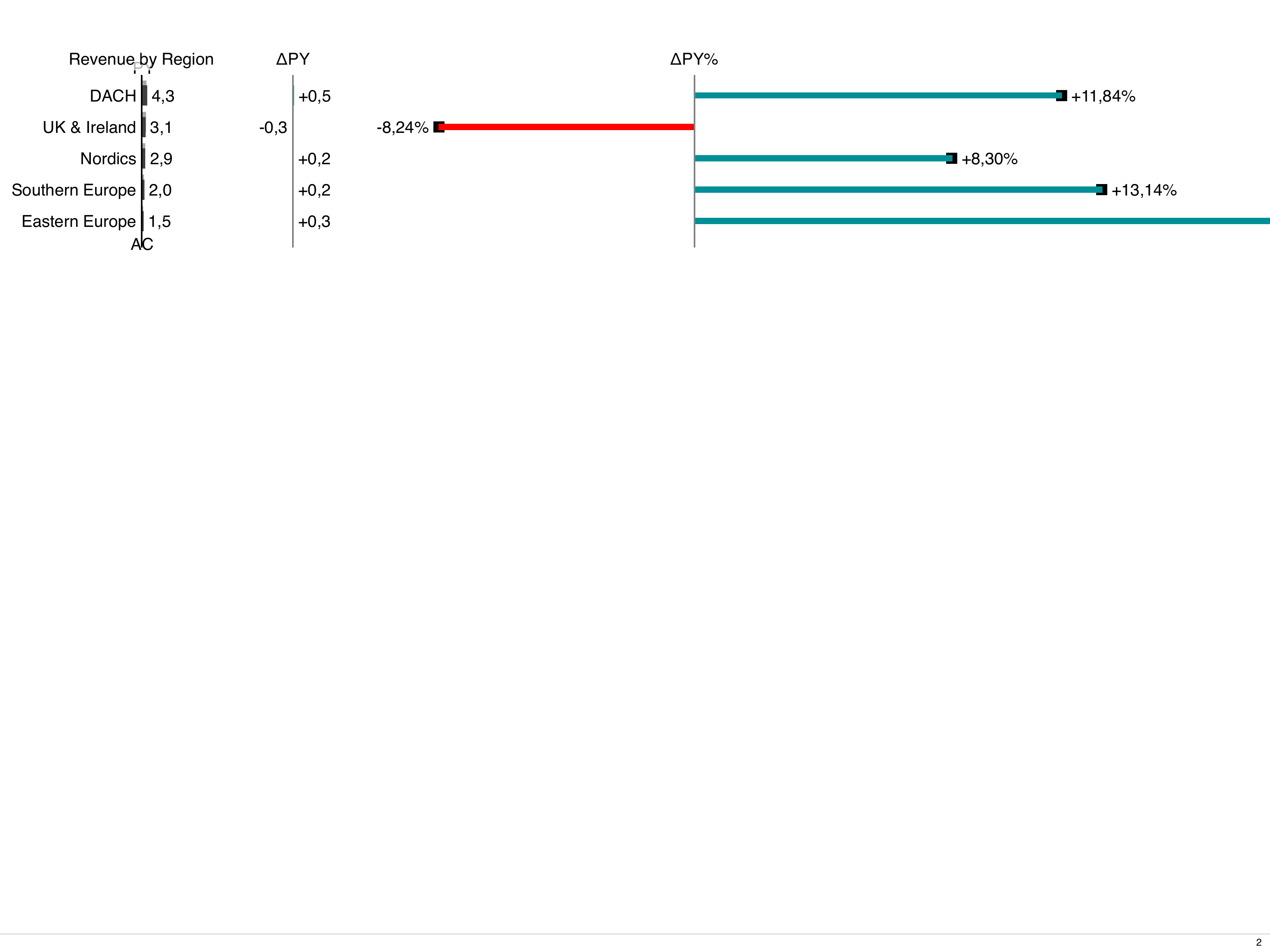
Here is an example of a screenshot captured by ScreenshotArtefact:
Use Cases
Section titled “Use Cases”- Export charts for PowerPoint presentations
- Generate thumbnail previews for dashboards
- Create image assets for documentation
- Capture specific visualizations for email reports
Minimal Example
Section titled “Minimal Example”The simplest screenshot artefact only needs filenamePrefix and refs.
The system automatically finds (or wraps) the component:
Output: export-umsatz_zahlen.png
Minimal definition
Section titled “Minimal definition”This is the smallest well-formed ScreenshotArtefact: the two required fields
(filenamePrefix, refs) plus the two that every usable image export sets, because the
defaults produce a small (1024x768) and blurry (1x) picture.
All attributes are listed in the Attribute Reference below.
The pages to render are found automatically from refs; if you need to pick them yourself,
layoutPages also accepts a single page name, a list of names or glob patterns, or a list of
page + params objects – see How Components Are Resolved.
Fields
Section titled “Fields”Required Fields
Section titled “Required Fields”spec.filenamePrefix– Prefix for all generated screenshot filenames.spec.refs– List of component references to capture (at least one):kind– Component type:ChartStructure,ChartTime,ChartScatter,ChartBubble,ChartBullet,Tree,Table,LayoutCard, orText.name– The component’smetadata.name.
Optional Fields
Section titled “Optional Fields”spec.layoutPages– ExplicitLayoutPagedocuments to render. Usually not needed – see How Components Are Resolved below. Accepts three forms:- a single page name as a string:
layoutPages: regional_dashboard - a list of strings, each a page name or a glob pattern:
layoutPages: [regional_*] - a list of objects with
page(exact name, no glob) and optionalparams(keys must match the parameter names declared in the page’smetadata.params).
- a single page name as a string:
spec.format– Viewport size:xga(default, 1024x768),hd(1280x720),full-hd/full_hd(1920x1080),4k(3840x2160) or4k2k(4096x2160). Other values (paper sizes such asa4orletter) are accepted by the schema but fall back to the XGA viewport.spec.orientation– Viewport orientation:portraitorlandscape(default:landscape).spec.language– Language for rendering:de(default) oren.spec.scale– Screenshot resolution:"css"– 1x resolution (CSS pixels). This is also the behaviour whenscaleis not set."device"– 2x resolution (retina/HiDPI). Recommended for sharp output.
spec.filenamePattern– Filename pattern:"ref"(default):{prefix}-{component_name}.png(e.g.,report-sales_chart.png)"index":{prefix}-001.png,{prefix}-002.png, etc.
spec.imageFormat–"png"(default) or"jpeg". Currently ignored by the renderer, which always writes PNG files.spec.quality– JPEG quality (1–100). Currently ignored by the renderer.spec.omitBackground– Iftrue, capture with transparent background (PNG only). Defaultfalse. Currently ignored by the renderer.
How Components Are Resolved
Section titled “How Components Are Resolved”When layoutPages is omitted (the recommended default), the system resolves each ref automatically:
- Page scan – All
LayoutPagedocuments are scanned for children matching the refkind+name(via inlinemetadata.nameorreffield). If found, that page is rendered. - Standalone wrap – If no page contains the component but a standalone document with the matching
kindandnameexists (e.g., aTabledefined in its own YAML file), bino synthesizes a bare-minimum wrapper page automatically and renders it. - Error – If neither is found, the build fails with a clear error message.
This means you can screenshot any named component in your project without manually wiring up pages.
When layoutPages is set, the system skips auto-discovery and only renders the specified pages. Use this when you need to control rendering params, page format, or when a component appears on multiple pages and you want a specific one.
Component Targeting
Section titled “Component Targeting”Components are targeted by their kind and metadata.name. There are two ways a component can have a name:
Inline Children (on a LayoutPage)
Section titled “Inline Children (on a LayoutPage)”Standalone Components (own YAML file)
Section titled “Standalone Components (own YAML file)”Both work identically in refs:
Examples
Section titled “Examples”Standalone Component Screenshot
Section titled “Standalone Component Screenshot”The simplest case – screenshot a component defined in its own file.
No layoutPages, no dedicated page needed:
Output: revenue-revenue_table.png
High-Resolution Multi-Component Export
Section titled “High-Resolution Multi-Component Export”Output:
q4-presentation-sales_overview.pngq4-presentation-monthly_trend.pngq4-presentation-kpi_summary.png
JPEG with Quality Control
Section titled “JPEG with Quality Control”imageFormat and quality are accepted by the schema, but the renderer does not use them yet
– every screenshot is written as PNG:
Output: weekly-update-weekly_chart.png
Indexed Filenames
Section titled “Indexed Filenames”Output: slide-001.png, slide-002.png, slide-003.png
Explicit Page Selection
Section titled “Explicit Page Selection”When a component exists on multiple pages (e.g., with different params) and you need a specific one:
Best Practices
Section titled “Best Practices”Use scale: device for sharp images. Without it, screenshots render at 1x CSS pixels which looks blurry on modern displays. The device setting renders at 2x (retina) resolution.
Prefer full-hd or hd format over paper sizes. Paper sizes (a4, letter) are designed for print layouts. Screen formats give components more natural proportions for digital use.
Let refs auto-resolve. Omit layoutPages unless you have a specific reason to set it. Auto-resolution keeps your manifests simple and avoids the format-matching pitfall (the page’s pageFormat must match the artefact’s format, otherwise the page is silently excluded).
Use standalone components for reusable exports. Define components in their own YAML files (e.g., components/kpi_table.yaml) and reference them by name. This way the same component can be used in reports, preview, and screenshot exports.
Match format when using layoutPages. If you explicitly set layoutPages, ensure the page’s pageFormat matches the artefact’s format. A full-hd artefact will not render an a4 page – the page is silently skipped. This is the most common cause of empty screenshots.
Supported Component Kinds
Section titled “Supported Component Kinds”| Kind | Description |
|---|---|
ChartStructure |
Structural/categorical charts (bar, waterfall, etc.) |
ChartTime |
Time-series charts |
ChartScatter |
Scatter plots |
ChartBubble |
Bubble charts |
ChartBullet |
Bullet charts |
Tree |
Hierarchical tree diagrams |
Table |
Data tables |
LayoutCard |
Card containers |
Text |
Text components |
- Components must have
metadata.namedefined to be targetable. - Screenshots are captured after the page has fully rendered (including async data loading).
- Multiple
ScreenshotArtefactdocuments can target the same components with different settings (e.g., PNG + JPEG, or different formats). - When auto-wrapping standalone components, the synthetic page inherits
formatandorientationfrom the artefact spec.
Attribute Reference
Section titled “Attribute Reference”Common Metadata
Section titled “Common Metadata”| Attribute | Type | Required | Default | Description |
|---|---|---|---|---|
apiVersion |
string | yes | - | Must be bino.bi/v1alpha1. |
kind |
string | yes | - | Must be ScreenshotArtefact. |
metadata.name |
string | yes | - | Unique identifier. |
metadata.labels |
object | no | - | Key-value pairs for categorization and constraint matching. |
metadata.annotations |
object | no | - | Arbitrary key-value metadata, not used by the system. |
metadata.description |
string | no | - | Free-form description. |
metadata.constraints |
array | no | - | Conditional inclusion rules. See Constraints. |
Spec Attributes
Section titled “Spec Attributes”| Attribute | Type | Required | Default | Description | Sample |
|---|---|---|---|---|---|
spec.filenamePrefix |
string | yes | - | Prefix of every generated screenshot filename. | filenamePrefix: quarterly-report |
spec.refs |
array | yes | - | Components to capture, at least one. Each entry is targeted by kind + metadata.name; see Component Targeting. |
refs: [{ kind: Table, name: summary_table }] |
spec.refs[].kind |
string | yes | - | Kind of the component to capture. Values: ChartStructure, ChartTime, ChartScatter, ChartBubble, ChartBullet, Tree, Table, LayoutCard, Text. |
kind: ChartStructure |
spec.refs[].name |
string | yes | - | metadata.name of the component to capture. |
name: sales_by_region |
spec.format |
string | no | xga |
Logical viewport size. Resolved sizes: xga (1024x768), hd (1280x720), full-hd / full_hd (1920x1080), 4k (3840x2160), 4k2k (4096x2160). Any other lowercase value (paper sizes such as a4) is accepted but falls back to the XGA viewport. |
format: full-hd |
spec.orientation |
string | no | landscape |
Viewport orientation. Values: portrait, landscape. Portrait swaps the format’s width and height. |
orientation: landscape |
spec.scale |
string | no | - (behaves like css) |
Screenshot resolution. css renders at 1x CSS pixels, device at 2x for sharp HiDPI output. |
scale: device |
spec.language |
string | no | de |
Language code passed to the renderer. Values: de, en. |
language: de |
spec.filenamePattern |
string | no | ref |
Filename pattern. ref produces {prefix}-{component_name}.png, index produces {prefix}-001.png, {prefix}-002.png, … |
filenamePattern: ref |
spec.imageFormat |
string | no | png |
Image format. Values: png, jpeg. Currently ignored - the renderer always writes PNG. |
imageFormat: png |
spec.quality |
integer | no | - | JPEG quality, 1-100. Only meaningful with imageFormat: jpeg, and currently ignored by the renderer. |
quality: 85 |
spec.omitBackground |
boolean | no | false |
Capture with a transparent background (PNG only). Currently ignored by the renderer. | omitBackground: true |
spec.layoutPages |
string or array | no | - (auto-discovered from refs) |
Pages to render: a single page name, or a list whose items are page names, glob patterns, or page + params objects. See How Components Are Resolved. |
layoutPages: regional_dashboard |
spec.layoutPages[].page |
string | yes (in object form) | - | Exact name of the LayoutPage to render, no glob pattern. |
page: regional_dashboard |
spec.layoutPages[].params |
object | no | - | Parameter values passed to the page. Keys must match the parameter names declared in the page’s metadata.params. |
params: { REGION: EU } |